Website migrations are one of the most failure-prone SEO processes when done incorrectly.
A single mistake can result in:
In this real-world case study, I’ll walk through how I successfully migrated my website from a subdomain to a new root domain, preserved authority, avoided ranking loss, and stabilized indexing using modern technical SEO practices aligned with Google’s 2026 direction.
→ This is not theory. This is a real migration with real fixes.

Migrating from a subdomain to a root domain is not just a URL change.
It directly affects:
In my case, the migration involved:
Any misstep here could have reset years of SEO progress.
Before touching redirects or DNS settings, I prepared the site properly.
This preparation prevented silent failures later.
Redirects are the backbone of any successful website migration.
Every old subdomain URL was redirected directly to its exact new root-domain equivalent.
This allowed Google to:

After deployment, I:
This single step alone prevents most migration disasters.
One of the biggest fears during migration is losing authority.
Here’s what helped retain it.
Google recognized the site as the same entity, not a new or unrelated domain.
This continuity reinforced my positioning as a trusted SEO specialist.
Structured data was preserved and aligned across the site:
This reinforced ownership, brand, and trust signals during the transition.
Even successful migrations can experience temporary indexing irregularities.
Some pages initially appeared as:
This was resolved by:
LiteSpeed caching temporarily served outdated versions of pages.
Fixes included:
This step is critical and often overlooked in migrations.
Caching does not directly block SEO but misconfigured caching does.
Problems occur when:
Once caching was properly cleared and synchronized, indexing stabilized naturally.
After stabilization:
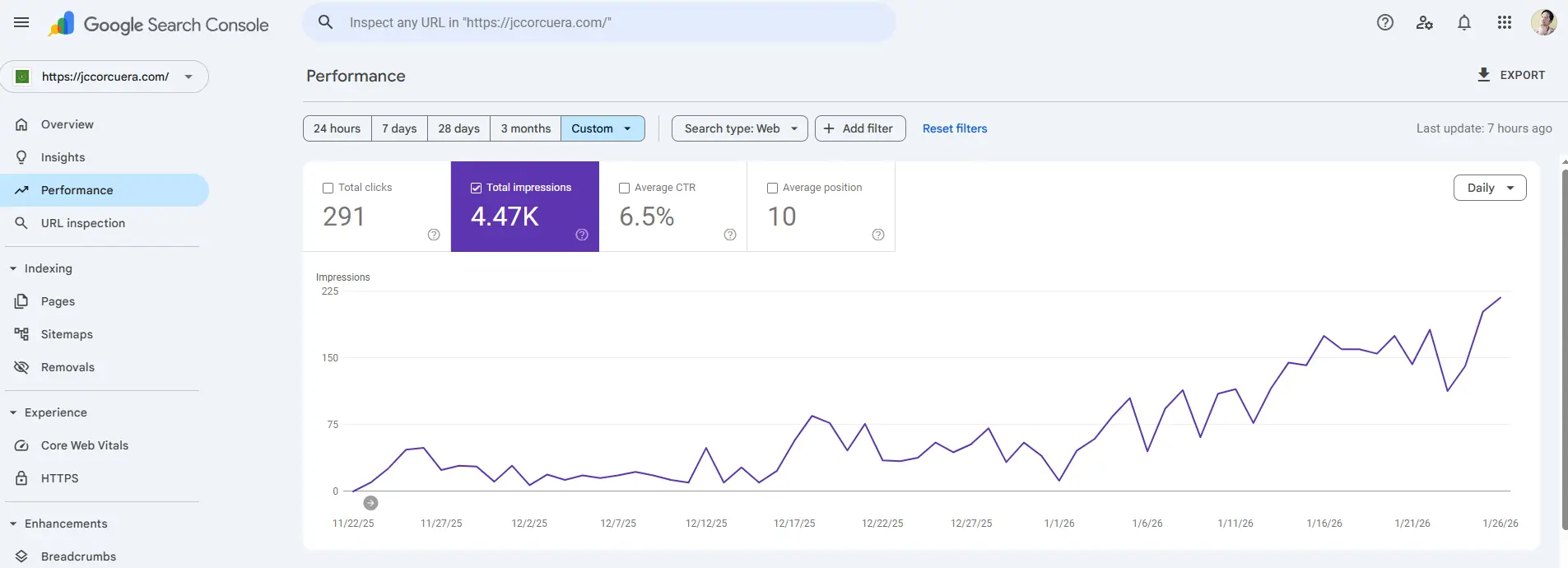
Most importantly, there was no long-term traffic loss.
If you’re planning a similar move, remember:
This is not just about redirects, it requires proper technical SEO audits and migration planning.
Rushing leads to irreversible losses.
Especially in modern Google search.
Not shortcuts.
Website migrations don’t fail because of Google but they fail because of poor execution.
With:
You can migrate without losing authority and often come out stronger.
This case study reflects how SEO in 2026 and beyond is no longer about tricks, but about clarity, trust, and real execution.
To migrate a website without losing SEO, you must:
Audit all existing URLs
Map old URLs to new URLs
Implement 301 redirects
Update internal links
Submit updated sitemap in GSC
Monitor crawl errors and rankings
Skipping redirects is the most common reason sites lose traffic after migration.
You must:
Create a full URL mapping
Apply 301 redirects from subdomain URLs to root URLs
Update canonical tags
Resubmit sitemap
Monitor indexing
Search engines treat subdomains and root domains separately, so authority consolidation is key.
Website migration refers to significant changes such as:
Domain changes
HTTPS implementation
Platform migration
URL structure changes
If done incorrectly, it can cause ranking drops. If done properly, it can preserve or improve SEO performance.
Reindexing can take a few days to several weeks depending on site size, crawl frequency, and technical setup. Clean sitemaps and internal linking speed up the process.
Johny Corcuera is a freelance SEO professional based in the Philippines. He works with businesses to improve search visibility through structured content, technical SEO, and long-term strategy.
His approach focuses on clarity, site structure, and aligning content with real search behaviour rather than relying on short-term tactics.
Local Events
Private Events